Mother’s Day 2026 AI Photo Editing Prompts — In today’s article, I am going to share some awesome prompts for the occasion of Mother’s Day, which is held on 10th May. There are multiple prompts given below, and the good thing is that they are suitable for both girls and boys. If you want to make this Mother’s Day memorable, then you should try the prompts given below. I am sure you will definitely like the results from these prompts. I request you all to please read all the paragraphs for better understanding.
Details of Mother’s Day AI Photo Editing Prompts
Mother’s Day AI photo editing is a creative way to turn simple pictures into emotional, visually stunning memories using tools like ChatGPT or other AI image generators. By using well-crafted prompts, you can transform normal photos into artistic styles such as hand-drawn sketches, cinematic portraits, or crayon-style illustrations that highlight the bond between mother and child. The process usually involves uploading a clear image, applying a detailed prompt (including scene, lighting, emotions, and styling), and letting the AI enhance or redesign the photo while keeping faces realistic and expressive. This trend has become especially popular on social media because it allows users to create personalized, heart-touching visuals that stand out and feel more meaningful than regular edits.
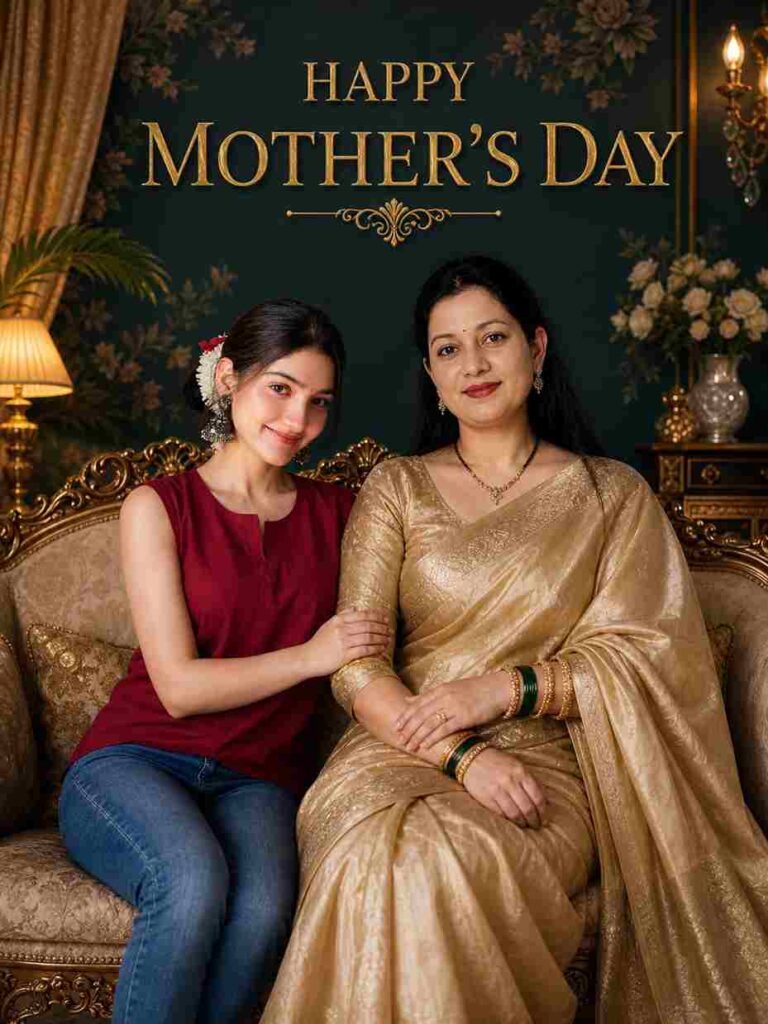
Ultra-realistic cinematic indoor portrait, royal luxury aesthetic.

Scene: A vintage royal living room with an ornate carved golden sofa. Background wall is deep dark teal/green with elegant floral patterns. Add soft curtains, warm ambient lighting, indoor plants, and premium luxury decor.

Subjects:
An Indian mother sitting gracefully on the sofa, wearing a rich golden silk saree with traditional jewelry (bindi, necklace, bangles), elegant and queen-like posture.

Her daughter sitting close beside her, slightly leaning in, wearing a modern stylish outfit (sleeveless top and jeans, no text), relaxed and confident.

Faces:
Use reference images for both faces. Maintain strong facial likeness, natural skin texture, realistic proportions. No beautification, no over-smoothing, no artificial plastic skin.

Expression:
Both looking directly at the camera with soft, calm, confident smiles, showing a deep emotional bond.

Text:
“HAPPY MOTHER’S DAY” in large elegant serif font on the wall, golden embossed lettering, cinematic premium look.

Lighting:
Soft cinematic lighting, warm tones, soft shadows, depth of field, subtle background blur.

Camera:
85mm lens, DSLR, shallow depth of field, ultra-detailed.

Quality:
8K resolution, RAW photo, hyper-realistic, sharp focus, natural colors, highly detailed skin texture.

Aspect Ratio: 3:4
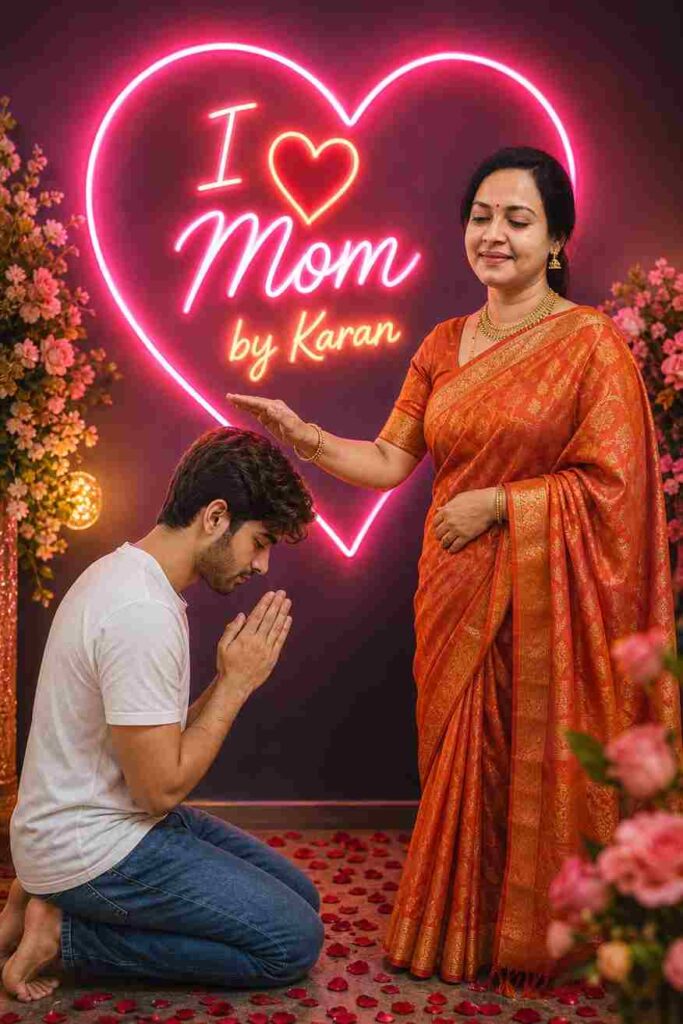
Create a highly realistic cinematic emotional scene with a neon aesthetic using reference images for strong facial resemblance.

A young Indian boy is kneeling on the floor in a respectful namaste/pranam pose, head slightly bowed, hands joined. His face is visible from a soft side profile. He is wearing a simple white t-shirt and blue jeans.

In front of him stands his mother, smiling gently and giving blessings with one hand raised over his head. She is wearing a traditional Indian saree in rich orange/red tones, with a bindi, gold necklace, bangles, and elegant simple jewelry.

Behind them, create a large glowing neon heart shape in vibrant pink.

Inside the neon heart, add glowing stylish typography:
“I ❤️ Mom”
 warm yellow with soft glow, bloom, and light diffusion effects.

Enhance the scene with:

Decorative flowers on both sides
Rose petals scattered across the floor
Warm ambient lighting
Neon reflections on skin and clothes
Soft shadows and cinematic depth of field
Slight background blur for realism

Style & Quality:

Ultra-realistic
DSLR-quality photograph
Natural skin texture (no smoothing, no artificial beauty filter)
Sharp focus, high detail
8K–16K resolution
Professional cinematic lighting

Negative Prompt (VERY IMPORTANT):
cartoon, painting, illustration, CGI, unrealistic face, deformed hands, extra fingers, blurry, low quality, oversaturated skin, artificial beauty filter, face distortion, duplicate face.
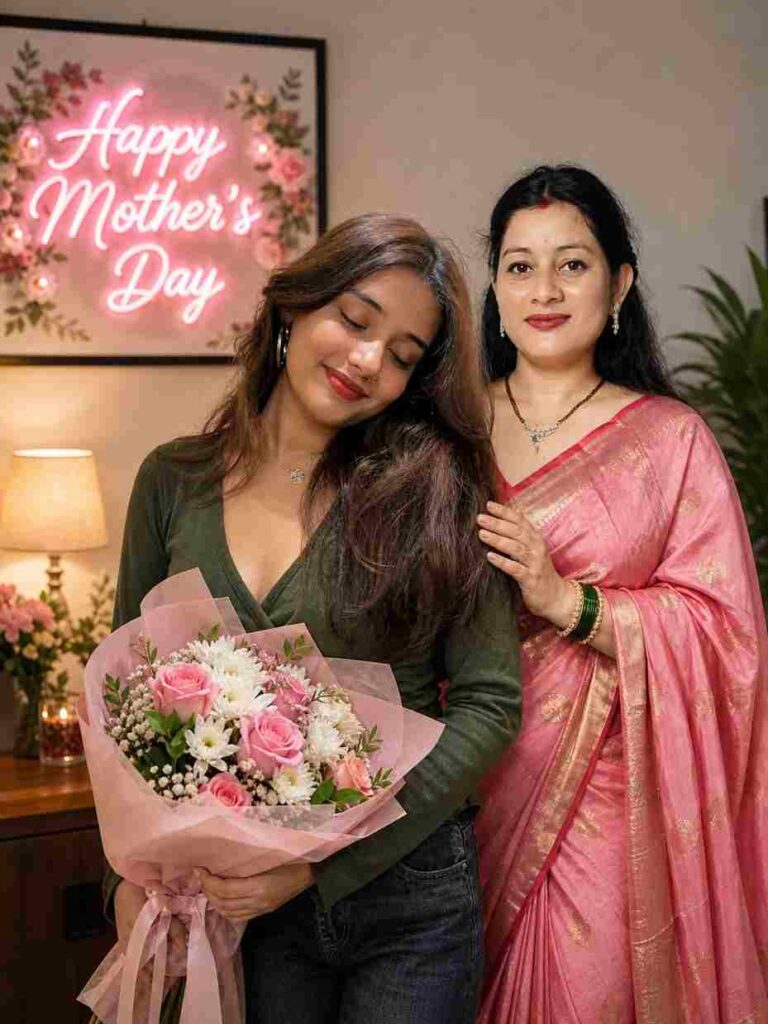
Create a highly realistic indoor emotional portrait using two face references.

[FACE REFERENCE]
Use the first uploaded image as the reference for the young girl’s face.
Use the second uploaded image as the reference for the mother’s face.
Keep facial features, skin tone, hairstyle, and expressions as close as possible to the originals.
Do not stylize or cartoonize faces. Maintain natural realism.

[SCENE]
A young Indian girl stands in the foreground, slightly angled, smiling softly with eyes gently closed. She is holding a beautiful bouquet of pink roses and white flowers wrapped in soft pastel pink paper with a ribbon. She is wearing a fitted deep green top and blue jeans.

Behind her, her mother stands very close, slightly behind her shoulder, placing one hand gently on her daughter’s shoulder. She is smiling warmly. She wears a traditional Indian saree in soft pink with golden patterns, along with a small bindi, bangles, and elegant jewelry.

[BACKGROUND]
- Cozy indoor home environment
- Warm ambient lighting
- Wooden table with decor items
- Indoor plant on the side
- Soft glowing lamp

On the wall, include a decorative frame with glowing soft pink neon-style text:
“Happy Mother’s Day”
Add subtle floral decorations around the text.

[LIGHTING]
Soft cinematic warm lighting, realistic shadows, gentle glow, natural highlights on skin.

[CAMERA]
DSLR photography, 50mm lens, shallow depth of field (f/1.8), sharp focus on subjects, background slightly blurred (bokeh).

[QUALITY]
Ultra-realistic, photorealistic, 8K resolution, natural skin texture, detailed hair strands, realistic fabric folds.

[NEGATIVE PROMPT]
cartoon, painting, illustration, CGI, over-smooth skin, blur, distorted face, unrealistic eyes, extra fingers, low quality
How to Use Prompts for AI Photo Editing
Using prompts for AI photo editing is simple and effective. First, select a clear and high-quality photo that you want to edit. Then, copy a well-written prompt that describes the desired scene, emotions, and style. Paste the prompt into your chosen AI tool and generate the image. The AI will process your input and create a visually enhanced version of your photo. To get better results, always include details like lighting, background, and expressions. Experimenting with different prompts can also help you discover unique styles and improve the overall quality of your images.
Tips to Make Your Photo More Attractive
To create eye-catching and emotional images, it’s important to focus on a few key details. Start by choosing a photo with clear faces and good lighting. Pay attention to expressions, as genuine emotions make your images more impactful. Selecting a suitable background and adding warm tones can enhance the overall mood. Avoid over-editing, as it may reduce the natural feel of the photo. Instead, aim for a balanced look that highlights both creativity and authenticity. Small improvements in detail can make a big difference in the final result.
Conclusion
AI photo editing is a powerful and creative way to make Mother’s Day 2026 truly memorable. With the right tools and well-crafted prompts, you can turn ordinary photos into beautiful, emotional, and meaningful visuals. This approach not only helps you express your love in a unique way but also allows you to create eye-catching content that stands out on social media platforms. You can experiment with different styles, backgrounds, and effects to match your vision perfectly. With a little creativity and effort, you can create lasting memories. If you face any problems while editing, feel free to let me know in the comments below.