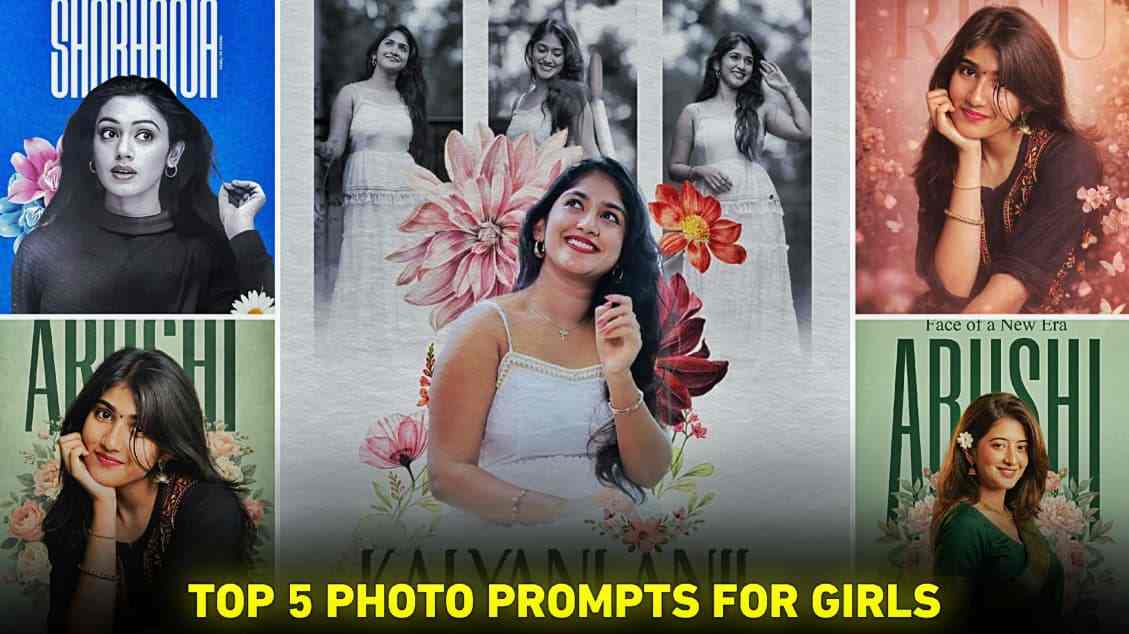
Friends, if you are interested in creating amazing AI images using prompts, then this article is going to be very helpful. In today’s article, we are going to share the top 5 fabulous ChatGPT prompts. These prompts are mainly for girls, as we have noticed that girls really like stylish photos on Instagram. Therefore, we have decided to provide the best AI prompts through which you can easily create your photos in different styles with ultra-realistic quality. So, we suggest that you check out the entire article for better results.
What Is an Aesthetic Poster-Style Photo?
An aesthetic poster-style photo is a type of image in which pictures are in portrait format and high quality. It includes amazing varieties of flowers and perfect typography with stylish fonts, which makes the overall image very attractive. When people see their name or inspirational text written on such images, girls especially love to create and post them on their social media handles.
Basically, we have provided the top 5 prompts that you can use in ChatGPT or Gemini. However, we recommend using ChatGPT for better results, as we have experienced this many times. Although it may take a little more time than Gemini, sometimes Gemini also gives good results. The good thing is that the image creation process is similar on both AI tools.
Top 5 Prompts for Aesthetic Photo Editing
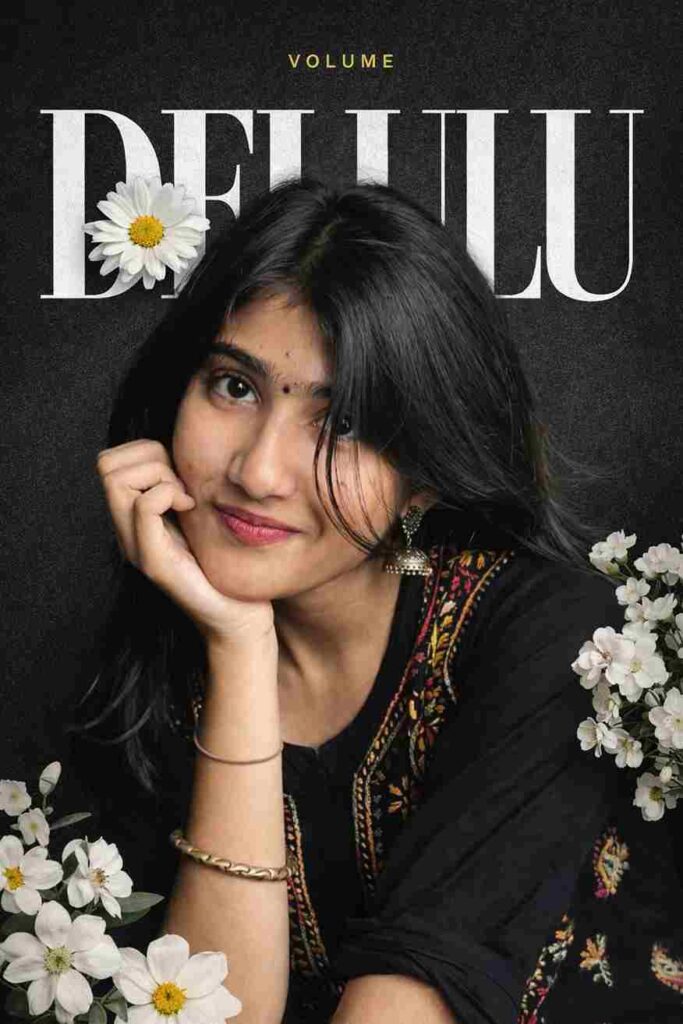
Use the uploaded image as the main subject. Strictly preserve the same face, identity, skin tone, and natural facial features. Do not beautify, retouch, or alter the face.
Create a modern high-end editorial collage poster in a trendy Instagram aesthetic.
COMPOSITION:
• Remove the original background and place the subject in the center (close-up portrait, slightly zoomed, face-focused)
• Add a dark grey textured gradient background with subtle grain
• Add large bold typography “DELULU” behind the subject:
• White color
• Mix of solid and outline font style
• Stretched across full width
• Subject slightly overlapping the text (face in front of letters)
• Add a realistic white daisy flower overlapping one letter near the hair/face area
• Add aesthetic realistic white flowers:
• Bottom left corner
• Right side middle area
• Add small minimal yellow title text at the top center:
• Clean modern font
• Very small size
• Soft yellow color
STYLE & LIGHTING:
• Soft natural lighting
• Realistic skin texture (no smoothing, no beauty filter)
• Slight glow around subject for separation
• High contrast but clean look
• Editorial / magazine cover style
• Strong depth layering (text behind, subject front, flowers layered)
COLOR PALETTE:
• Black / dark grey background
• White typography and flowers
• Yellow accent text only
QUALITY:
• Ultra sharp
• 4K resolution
• Clean edges, perfect cutout
• Premium Instagram luxury aesthetic
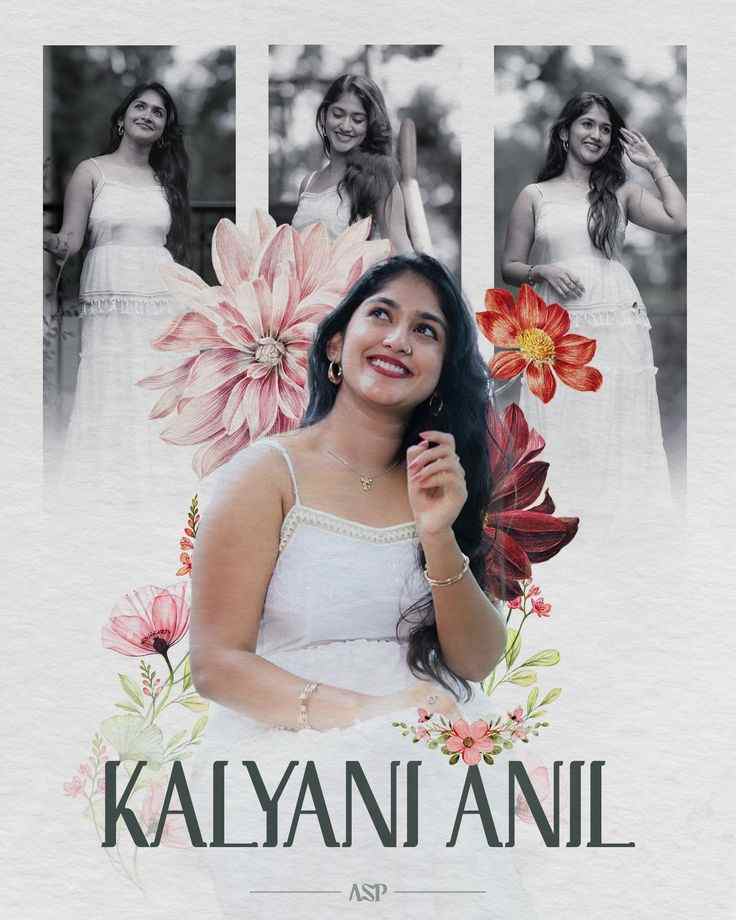
Use the uploaded reference image as the main subject. Strictly preserve the same face, identity, skin tone, and natural details. Do not modify facial features.
Create a modern aesthetic editorial collage poster in a high-end Instagram trendy style.
COMPOSITION:
• Remove background from the reference image and place the subject in the center (waist-up crop, sharp focus, high detail)
• Duplicate the same subject 3 times and arrange them in the background (top left, top center, top right)
• Convert these background duplicates into black and white
• Apply soft blur and reduce opacity (60–70%) for a faded layered effect
• Ensure the center subject remains in full color, bright, sharp, and visually dominant
BACKGROUND:
• Use a soft beige / off-white textured paper background
• Minimal, clean, aesthetic look with subtle grain
ELEMENTS:
• Add large realistic floral elements (pink, peach, red flowers)
• Place flowers behind the subject and slightly overlapping in front for depth
• Add small leaves and subtle floral accents around the composition
• Maintain balanced and symmetrical editorial layout
TYPOGRAPHY:
• Add bold elegant serif font (Vogue-style, luxury editorial look)
• Text at bottom: "KALYANI ANIL"
• Increase letter spacing slightly for premium feel
• Add a thin decorative horizontal divider line below the name
• Center-align text and keep it minimal
LIGHTING & COLOR:
• Soft natural lighting on subject
• Warm pastel tones and smooth color grading
• Maintain realistic skin texture (no over-smoothing)
• Add subtle shadow under subject for depth
QUALITY:
• Ultra high resolution, 4K
• Professional editing, sharp details, clean edges
IMPORTANT:
• Do NOT change face, expression, or identity
• Keep original pose and natural look
• Maintain realistic proportions and features
STYLE KEYWORDS:
aesthetic collage poster, editorial magazine layout, floral design, minimal luxury, soft vintage, instagram trending, high fashion style, clean composition
EXTRA:
image reference strength high, face consistency, identity preservation, no face distortion.
How to Create Aesthetic Poster-Style Images
Creating stunning aesthetic poster-style images is very easy with AI tools. Just follow these simple steps:
- Download ChatGPT or Gemini for the best experience.
- Install the app from the Play Store or App Store.
- Open the app and sign up or log in.
- Upload a clear and good-quality photo of yourself.
- Copy and paste the prompt provided below.
- Send the prompt and wait a few seconds.
- Your Aesthetic image will be ready—save it to your device.
What Are the Benefits of Creating AI Images?
Creating AI images offers many advantages, especially for content creators and social media users. It allows you to generate high-quality, creative visuals without needing advanced design skills or expensive software. With AI, you can quickly experiment with different styles, backgrounds, and concepts to match your personal brand or mood. It also saves time and effort compared to traditional editing, making it easier to produce eye-catching content for platforms like Instagram. Overall, AI image creation helps boost creativity, improve visual appeal, and make your content stand out effortlessly.
Conclusion
In this article, I have explained how to create new aesthetic poster-style photos using ChatGPT or Gemini with the help of prompts. We have provided the top 5 photo prompts; however, due to their length, only two prompts are shown here, and the remaining three are available in PDF format. When you click the “More Photo Prompts” button, you will get access to the other three prompts as well. All these prompts have been fully tested and deliver amazing results. We hope this article is helpful to you, and if you find it useful, please share your feedback by leaving a comment.