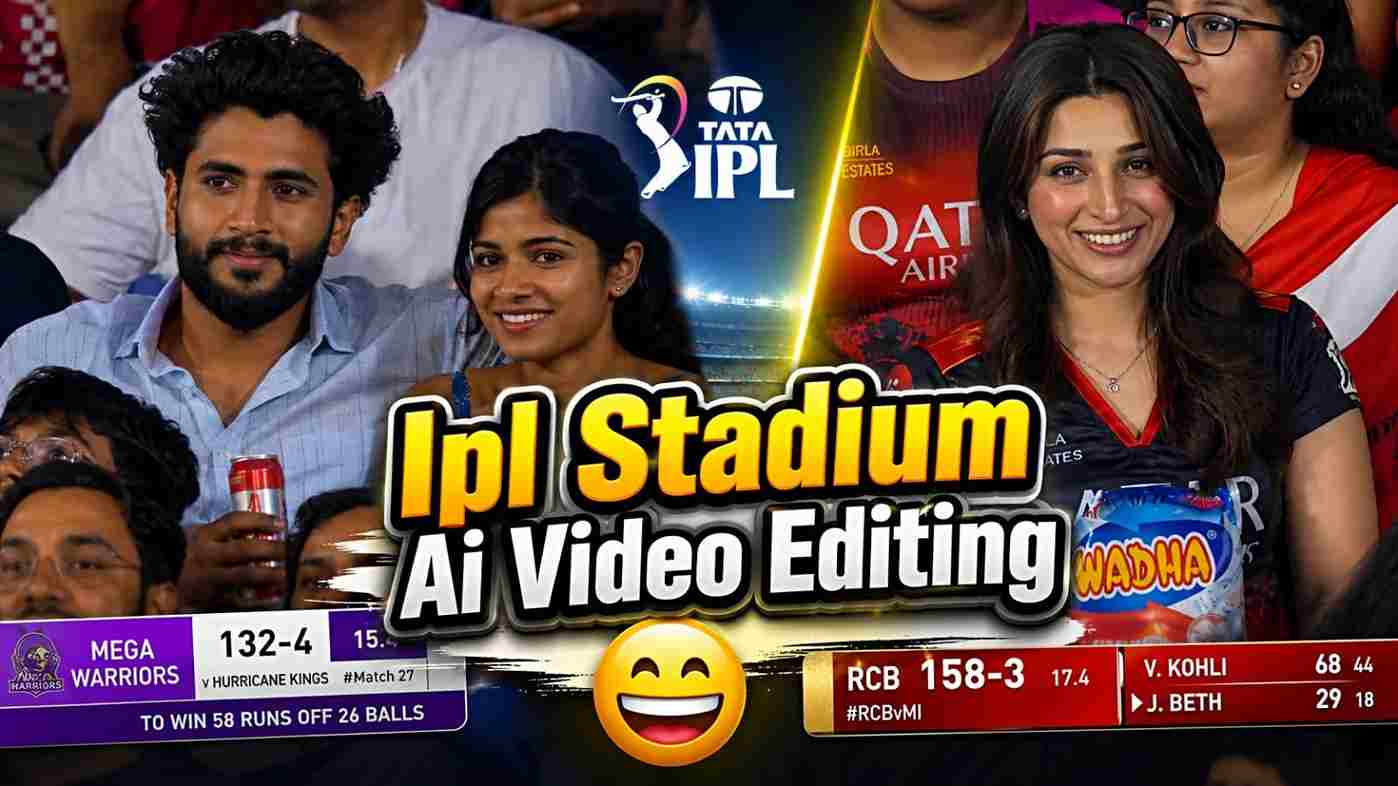
Friends, currently the IPL cricket stadium and Korean baseball AI video trend is going viral on social media. People are continuously creating amazing videos with their faces, which inspires others to make similar AI videos. In this article, I am going to explain everything from A to Z, including how to generate IPL cricket stadium AI videos for free. If you watch IPL and have a favorite IPL team, then you should definitely try this trend once because your video might even go viral on social media. So guys, if you are interested, make sure to read this full article for better understanding and to get the desired results.
Details of IPL Cricket Stadium AI Video
If you are active on Instagram, you might have seen IPL broadcast-style videos or Korean baseball AI videos that look like real people watching matches in the stadium. Using ChatGPT or Flow AI, you can also create such AI images and videos without spending much money, effort, or time. By creating these AI videos, you can shock your friends, and they will ask you how you made them — then you can easily explain the process. After generating the AI video from Flow AI, you can do a little editing in any editing app and use a viral Instagram song that is trending for IPL cricket stadium videos. The image creation process is shared in the paragraph below.
Couple IPL Stadium AI Video Editing Prompts
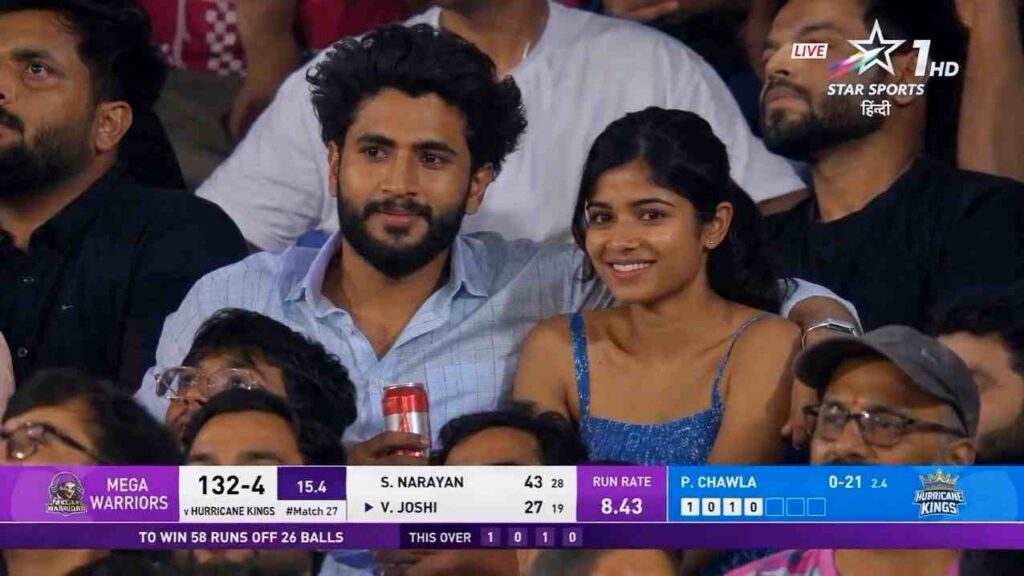
PHOTO PROMPT ⬇️
Create a photorealistic 16:9 live Indian cricket broadcast screenshot of a young couple captured from far away by a stadium zoom camera during an IPL-style night match.
Use the provided face reference image for the man and keep his facial features highly accurate: same face shape, eyes, nose, lips, beard/stubble pattern, skin tone, hairstyle volume, and natural expression. Do not beautify or change his identity. He should look like the same person from the reference, only seated in a cricket stadium.
Use the provided woman reference for the woman, but make her realistic and human, not doll-like. Keep her attractive but grounded with natural skin texture, realistic eyes, subtle imperfections, believable facial proportions, and soft candid expression.
Scene:
The couple is sitting among a dense crowd inside a packed Indian cricket stadium during a night match. They are not posing for the camera. They look like they were unexpectedly picked up by the long-range broadcast camera installed in the stadium. The camera is far away and zoomed in, like real IPL audience reaction shots.
Important camera style:
This should NOT look like a camera is directly in front of them.
This should NOT look like a close DSLR portrait or staged photoshoot.
Make it look like a telephoto broadcast zoom shot from across the stadium.
Use long-lens compression, slightly flattened perspective, medium-wide crowd framing, mild atmospheric haze, subtle broadcast softness, minor motion blur, slight digital zoom artifacts, realistic compression noise, and live TV sharpness.
The couple should be visible clearly, but not overly crisp or perfectly lit.
Composition:
Frame them from the audience section, with other spectators partially blocking the foreground and background. Some heads, shoulders, flags, and jerseys should naturally overlap the frame, making it feel like the broadcast camera is peeking through the crowd. The couple should be seated in the middle rows, not isolated. Keep surrounding fans close to them so they feel integrated in the stadium crowd.
Pose and emotion:
The man has his arm naturally around the woman’s shoulder and holds a red-and-silver soda can in his other hand. He wears a light blue casual shirt or a light checkered shirt, matching the cool blue stadium vibe. The woman wears a blue summer dress. They are looking at each other with shy, warm, candid chemistry, as if they just realized they are on the big screen. Their expressions should be natural, slightly surprised, and sweet, not posed.
Lighting:
Use only ambient stadium lighting and weak spill light from the cricket field. No cinematic spotlight. No dramatic key light. No beauty lighting. The couple should blend into the crowd brightness naturally, like a real live match broadcast. Skin tones should have natural stadium-light shadows and slight unevenness.
Background:
Packed Indian cricket stadium, night match atmosphere, fans in blue jerseys, waving flags, LED ribbon boards, stadium seating, blurred crowd movement, lively but realistic environment. The crowd should feel dense and natural, not generated or empty.
Broadcast overlay:
Add a Star Sports-style Indian cricket broadcast presentation:
- channel watermark in the top corner, inspired by Indian sports TV
- LIVE tag
- modern cricket scoreboard lower-third
- fictional team names only
- fictional score, overs, wickets
- run rate or required run rate
- batsman and bowler stats
- small commentary ticker
- clean layered TV graphics

Do not use real IPL team names, real player names, real sponsors, or real match details. Use fictional teams and fictional players.
Quality:
Ultra-photorealistic, authentic live sports telecast look, realistic human skin texture, natural fabric details, believable stadium zoom-camera perspective, subtle compression artifacts, slightly imperfect broadcast capture, candid audience reaction moment.
Negative prompt:
Do not make it look like a professional portrait photoshoot.
Do not make the couple look directly into the camera.
Do not use cinematic lighting.
Do not isolate them from the crowd.
Do not make the faces overly smooth or doll-like.
Do not make the man’s face generic.
Do not change the man’s identity from the reference image.
Do not create fake plastic skin.
Do not use real IPL team names or real player names.
Do not make the scoreboard unreadable or messy.
Do not make it look like a front-facing mobile photo
VIDEO PROMPT ⬇️
Ultra-realistic IPL live broadcast crowd-cam animation, same boy and girl from uploaded image, exact same faces, outfits, hairstyle, glasses, proportions, and stadium seating position.
The camera slowly zooms in like a real cricket telecast audience camera. The boy and girl smile naturally at the stadium camera while both together make a heart symbol using their hands. After that, the girl gently turns toward the boy and gives him a soft kiss on the cheek. The boy reacts with a shy smile.
Natural candid couple behavior, subtle realistic movements, authentic live sports broadcast feeling, packed Mumbai Indians stadium in background, blue crowd jerseys, floodlights, shallow depth of field, realistic human expressions, cinematic telephoto lens look, slight handheld broadcast shake, JiCinema IPL live match aesthetic, ultra-realistic skin texture, emotional wholesome vibe, smooth simple animation, 16:9 aspect ratio.
Create Your IPL Cricket Stadium Photo Using Chatgpt
To create an IPL Broadcast AI photo, you need to follow the simple steps given below for the best results. First, you must have the ChatGPT app for a better experience. If you do not have it, install it from the Play Store or App Store. Once installed, open the app and sign up or log in with your Google account. After that, upload your normal photo into the ChatGPT app and paste the prompt given below. (In the prompt, you can customize the jersey name and IPL team name, like changing CSK to your favorite team.) Then send the prompt and wait for a while. Your image will be ready shortly — just save it to your phone.
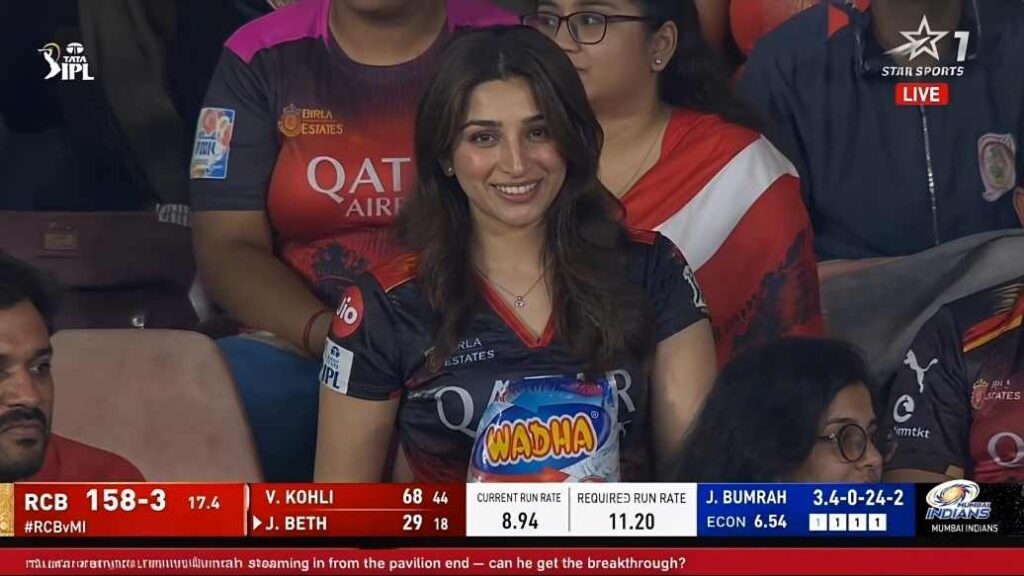
A screenshot from a live IPL cricket TV broadcast on Star Sports. The camera cuts to the audience our reference image person sitting in the crowd, smiling naturally and unaware they're on camera. The subject and is wearing csk jersey, is seated in premium stadium seats near the boundary rope during a high-energy match between Royal Challengers Bengaluru (RCB) and Chennai Super Kings (CSK). Hardlock: Do not alter their facial structure, skin texture, or likeness in any way.

The stadium atmosphere is electric packed crowd, vibrant red and yellow team colors throughout the stands, dramatic stadium floodlights, flags waving, blurred motion from cheering fans in the background. Full authentic cricket broadcast overlay visible: IPL-style scorecard graphics, Star Sports logo watermark, over count, team scores, player stats ticker, match status.

The game is IPL playoffs - Qualifier match atmosphere. CSK currently leading the series momentum after dominating previous matches against RCB.

The image should look exactly like a real TV broadcast screenshot - realistic sports broadcast cinematography, live camera framing, authentic sports color grading, slight compression artifacts, interlacing grain, subtle motion blur, realistic depth of field from a broadcast zoom lens, candid audience capture aesthetic.

16:9 aspect ratio, ultra-realistic live sports broadcast feel, indistinguishable from an actual televised IPL match screenshot.
How to Generate IPL Cricket Stadium AI Video
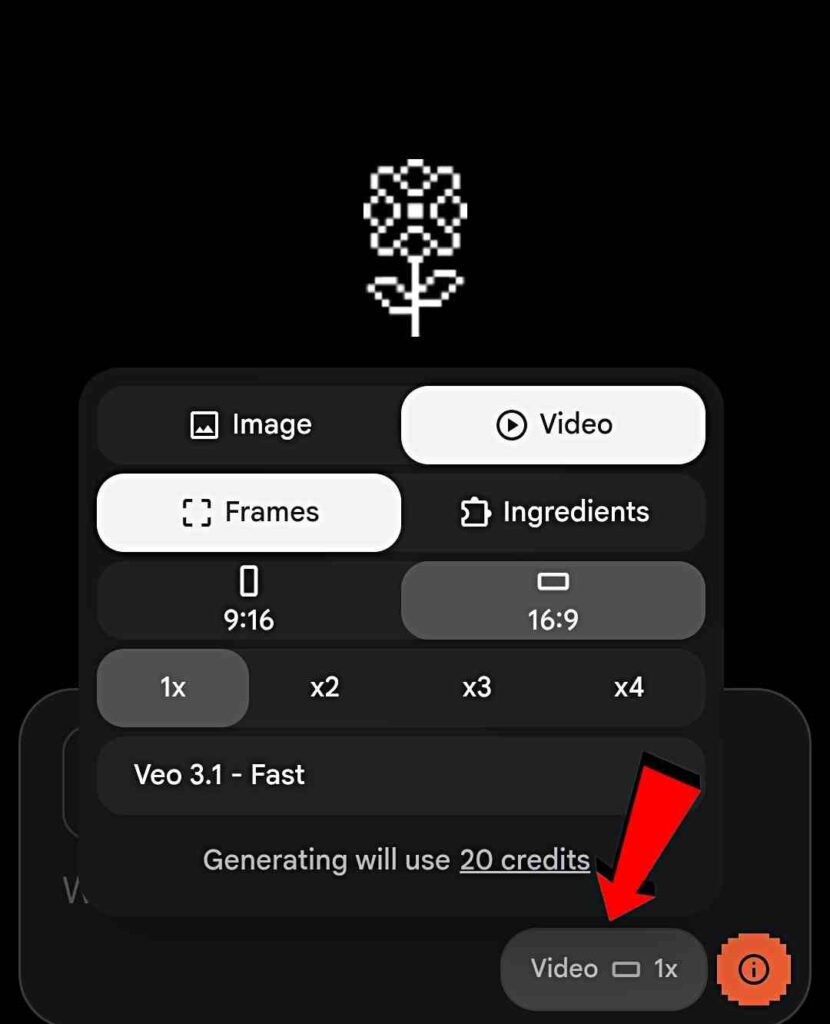
In the above paragraph, I talked about how to create AI images using the ChatGPT app. Now, I am going to talk about AI video generation. To generate a video, follow the easy steps given below. First, open Google or any browser on your phone and search for Flow AI. Click on the official Flow AI website and sign up or sign in. After that, click on the “Create Project” option, where you will see the “Video” option. Tap on the Video option located at the bottom-right corner. Now, you will see many options. Select Video, Frames, 16:9, and 1x settings. These are the settings you need to apply. For better understanding, you can see the reference image shared below. Next, click on the “Start” option, upload your ChatGPT-generated image, and paste the prompt. The video prompt is given below — simply copy it.
The shot feels exactly like a genuine TV crowd cutaway during a tense moment of the game when the broadcast camera finds a notable guest in the audience. The subject from the reference image is seated in the crowd wearing the same t-shirt, same hairstyle, same facial features, same lighting, and same stadium environment from the original image. Preserve identity strongly and maintain facial consistency throughout the full sequence. This is a real live sports-broadcast style shot - not cinematic film style. The subject is smiling casually and naturally, reacting to the match atmosphere. she is not performing for the camera and is not constantly making eye contact with the lens. Her behavior should feel completely authentic, like a real crowd reaction captured during a live game. One continuous take. No cuts. No camera angle changes. Action Timeline 0 to 2 seconds: The camera lands on her in the crowd naturally.

She smiles casually while watching the game. She briefly glances toward the field, then toward the giant stadium screen/Jumbotron, then back toward the match. Background crowd movement feels alive and energetic. 2 to 4 seconds: She notices himself on the big screen and gives a relaxed natural wave toward the camera. Her eyes look at the camera
Conclusion
In this article, I have talked about the social media viral trend of IPL Broadcast AI videos and Korean baseball-style AI videos. These types of AI videos are trending on social media, and many people are creating them to gain lots of views. In this video, I have explained everything in full detail, including how to create AI images and how to turn your ChatGPT-created images into realistic AI videos. I hope you enjoy this editing tutorial. If you do, feel free to share your thoughts with me in the comment box. If you have any problems, you can contact me on my Instagram account.