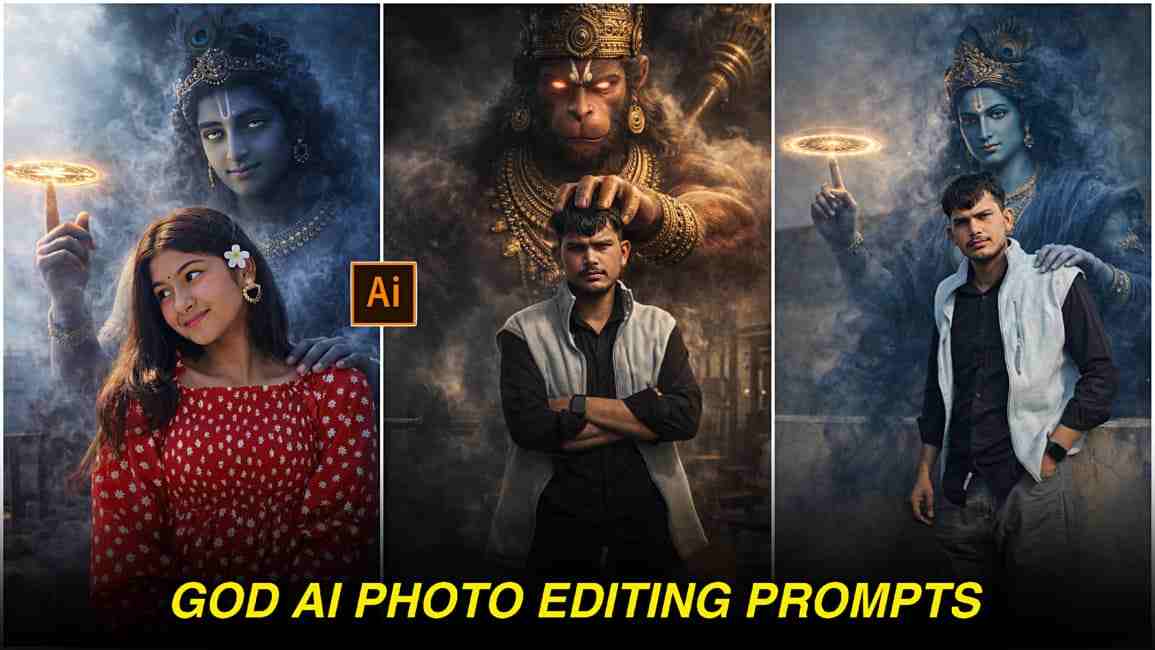
Viral God AI Photo Editing Prompts 2026- Friends, in this article, I’m going to share some amazing prompts that will help you easily create AI images with your favorite deities, whether it’s Hanuman Ji, Shiv Ji, or Krishna Ji. The best part about these prompts is that they generate highly realistic images without face distortion or any kind of watermark. Today, many people are using advanced AI tools like ChatGPT and Gemini to create stunning images because these platforms have become incredibly powerful and deliver results exactly as described in the prompt. Without spending too much time on editing, you can create high-quality images in just a few simple steps. Below is the complete process—make sure to read the entire article for a better understanding and to achieve the best results.
Why God AI Photos Are Going Viral in 2026?
God AI images are going viral in 2026 because modern AI tools can now create highly realistic visuals without face distortion. All you need to do is provide a well-written prompt to platforms like ChatGPT or Gemini, and the AI will analyze your request to deliver impressive results that people genuinely love. The best part is that creating these images requires no special skills—it’s as simple as copying and pasting a prompt. Many content creators share trending prompts on their Instagram handles; you can simply copy one, open your preferred AI tool, upload a clear photo, and paste the prompt. Within moments, the AI generates an image that looks stunning and professional. If you’re not satisfied with the first result, you can easily retry until you get an output that perfectly matches your expectations.
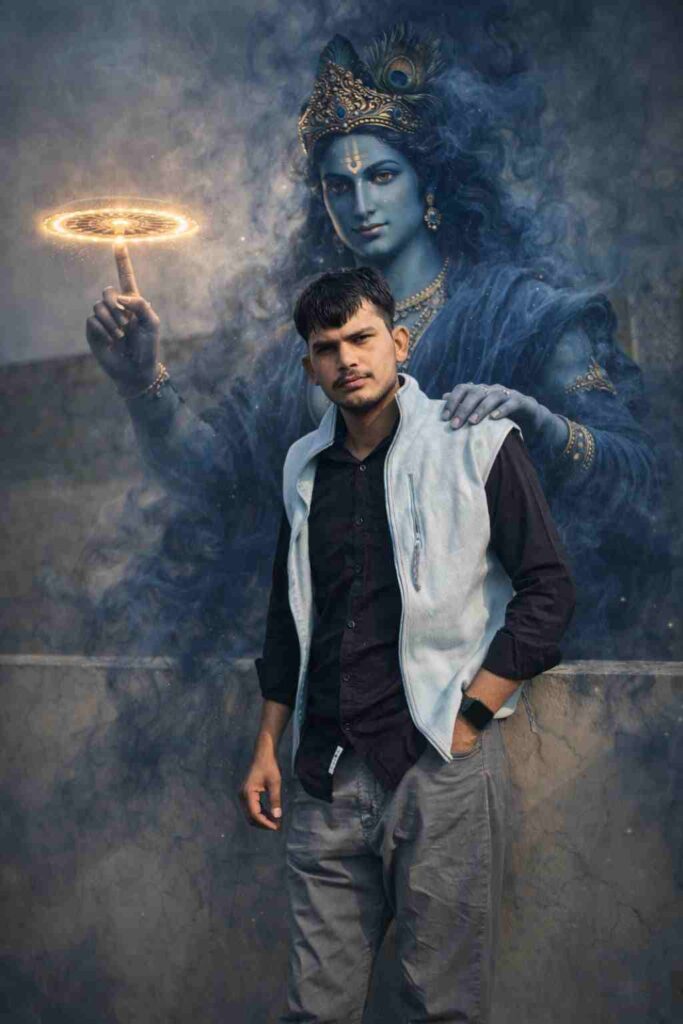
Create an ultra-realistic, high-resolution cinematic portrait using the provided reference image. Preserve the subject exactly as they are — do not alter the face, body, skin tone, expression, hairstyle, clothing, posture, or composition in any way.
Behind the subject, manifest a divine appearance of Lord Krishna emerging naturally from the environment. Krishna must be large yet perfectly scaled to match the subject’s height, camera angle, and perspective.
His form should be constructed from swirling deep-blue smoke, soft volumetric shadows, and subtle glowing particles — partially transparent but clearly recognizable. Avoid ghostly, horror, cartoon, or fantasy-art styles. Maintain authentic Hindu iconography.
Krishna should have calm, compassionate, faintly glowing eyes that convey protective power rather than aggression.
Place the Sudarshan Chakra elegantly rotating on one raised finger with soft golden light emission that realistically affects nearby smoke and atmosphere.
His other hand should rest gently on the subject’s shoulder from behind in a blessing and protective gesture — ensuring the subject’s face, hair, and body remain fully visible.
Environmental Integration (EXTREMELY IMPORTANT)
Match the original lighting direction, softness, temperature, and contrast
Replicate the same depth of field and background blur
Add physically accurate rim lighting where Krishna intersects light sources
Generate realistic contact shadows
Preserve natural color science and dynamic range
Ensure smoke interacts with ambient light correctly
Cinematic Color Grading
Apply professional cinematic color grading similar to high-end digital cinema:
Natural skin tones
Slightly cool shadows with gently warm highlights
Controlled contrast (avoid crushed blacks)
Wide dynamic range
No oversaturation
No artificial neon colors
Portrait Quality Requirements
8K detail
Hyper-real textures
Sharp facial clarity
Natural micro-contrast
Professional lens rendering
Subtle film-grade tonal separation
Strict Rules
Do NOT modify the subject
Do NOT crop, warp, or distort the image
Do NOT change the background composition
No watermark
No text
No artificial glow on the subject
The final image must feel dramatic, mystical, powerful, and cinematic — as if a divine guardian has been captured naturally through shadow, smoke, and light in a real photograph./pre>
How to Create These Images (Super Simple Steps)
Follow the simple steps below to create AI images with your favorite gods:
- Open the ChatGPT app or website, or use Gemini AI.
- Sign in using your Google account or email ID.
- Upload a clear photo of your face to achieve the best results.
- Copy the prompt provided below and paste it into the AI tool.
- If you’d like, you can customize the prompt to match your preferences.
- Click the Send or Generate button and wait a few moments.
- Once the image is ready, download and save it to your phone.
Pro Tip: Always use a high-quality, well-lit photo for more realistic and impressive AI-generated images.
Pro Tips for BEST Results (High Authority Section)
For the best results, make sure to upload a clear, high-quality photo of yourself when using ChatGPT or Gemini. A well-lit image with good facial visibility helps the AI generate more accurate and realistic outputs. If you’re still not satisfied with the result, try adding a negative prompt such as “do not change my face,” “no watermark,” “no distortion,” or “maintain natural facial features.” This guides the AI on what to avoid and significantly improves the final image quality.
Conclusion
In this article, I have explained how to create realistic AI images with your favorite gods. Throughout the guide, I’ve covered every step to help you generate stunning images easily, along with sharing pro tips to achieve the best possible results. I hope this article helps you a lot, but if you still face any issues or have questions, feel free to let me know in the comments or reach out for a quick response on my Instagram handle.